Gmail with
more control.
Newest-first conversations, message zoom, custom label order and Auto BCC.
A desktop-style interface for the Gmail account you already use.
Free for now. All features. No payment details required.
Free Chrome extension · No subscription required
A desktop-style
view of Gmail.
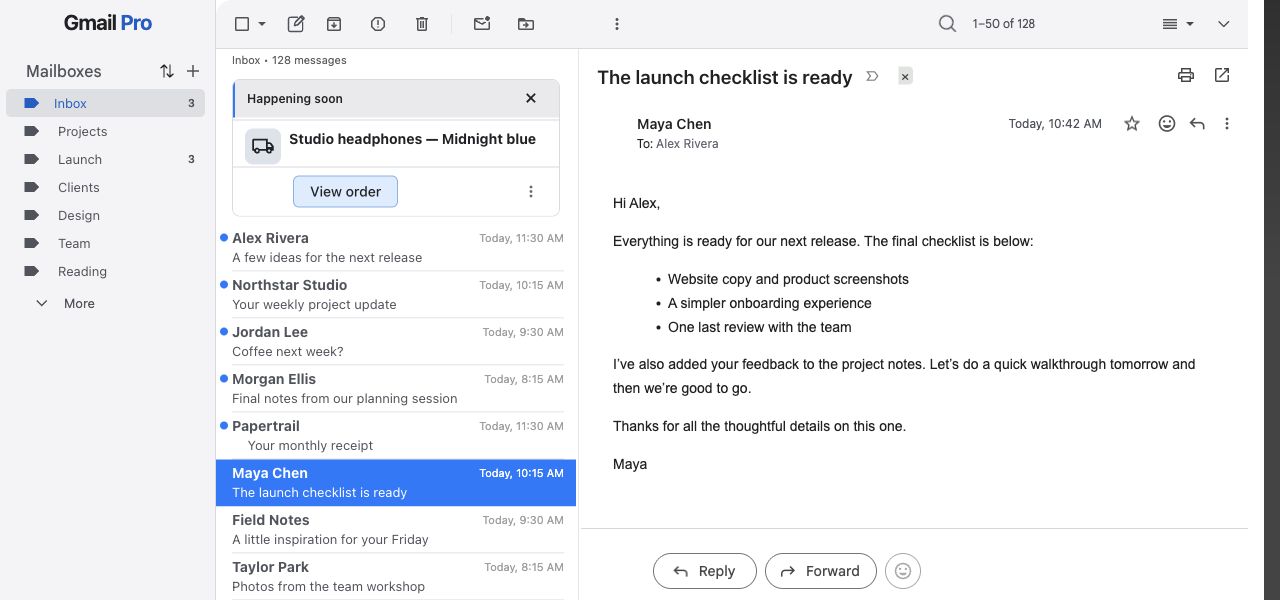
Gmail Pro restyles the inbox, starts with a right-hand reading pane, and collapses the header and app rails. Resize the panes and change the settings to suit your work.
- Compact conversation list and a large reading pane
- Message actions and search in the main toolbar
- System, light and dark themes, plus eight accent colors
Gmail continues to handle your messages, drafts and mail actions.
What Gmail Pro adds.
Additional controls beyond Gmail’s built-in settings, plus changes to how its existing controls are presented.
Newest-first conversations
GmailThreads show messages in their normal conversation order.
Gmail ProPut the newest message at the top of an opened thread. Gmail’s stored conversation history stays intact.
Message-only zoom
GmailBrowser zoom also enlarges Gmail’s controls.
Gmail ProZoom the message body from 80% to 200% with keyboard shortcuts. The surrounding interface keeps its size; each new conversation resets to 100%.
Custom label order
GmailLabels and folders use Gmail’s sidebar ordering.
Gmail ProChoose the visual order of AI Inbox, Inbox and top-level labels. Move sublabels to a different parent or hide a sidebar branch from the organizer.
Automatic BCC
GmailThe compose window provides a BCC field for each message.
Gmail ProAdd one configured BCC address to new messages, replies, Reply All and forwards. Off by default, with no saved address. Review recipients before sending.
One-click filing
GmailReading and archiving are separate mail actions.
Gmail ProClick an existing custom-label badge in Inbox to mark the conversation read and archive it, keeping its labels. Gmail’s Archive Undo remains available.
Automatic page changes
GmailThe conversation list has Next and Previous page controls.
Gmail ProKeep scrolling at either end of the list to change pages, or click the paging prompt. Each page replaces the previous one.
Floating replies by default
GmailGmail has an inline reply editor and a floating composer.
Gmail ProAutomatically open Reply, Reply All and Forward in Gmail’s floating composer. Set each action independently; Gmail keeps control of drafts and sending.
Keyboard shortcuts
GmailGmail has its own keyboard shortcuts and underlying mail actions.
Gmail ProAdd keyboard shortcuts for Archive, Trash, read/unread, expand/collapse, Send, Undo, Reply All and Forward. Each shortcut can be switched off.
Desktop-style layout
GmailGmail supplies the mailbox, reading pane and mail controls.
Gmail ProUse a redesigned sidebar and toolbar with a right-hand reading pane. Collapse the header and app rails to use less space.
Two-line conversation list
GmailGmail owns the original rows and conversation state.
Gmail ProShow sender and subject on separate lines, with unread dots and accent-colored selection. Keep this layout even if you turn the full appearance mode off.
Clear recipient details
GmailGmail supplies the sender and recipient information it exposes.
Gmail ProSeparate To, CC and BCC labels onto clearer lines in message headers. This does not reveal recipients Gmail has not made available.
Click to copy an address
GmailSender and recipient names link to contact details.
Gmail ProClick a sender or recipient name in the message header to copy the email address. Enter or Space also works when the contact is focused.
Readable search controls
GmailGmail handles search, suggestions, filters and matching.
Gmail ProKeep search in the compact toolbar, make existing match highlights readable in your theme, and return to the mailbox when clearing a search.
Dates and times in the list
GmailGmail provides each conversation’s timestamp.
Gmail ProSee Today or Yesterday with the time. Older mail shows weekday, date, year and time directly in the conversation list.
Message actions in reach
GmailReply, Reply All, Forward and reactions belong to Gmail.
Gmail ProKeep supported message actions in the main toolbar while reading. Use the native conversation controls whenever space is limited.
Visible Undo Send notice
GmailGmail supplies Undo Send and its cancellation window.
Gmail ProKeep the native sent notice visible with the header collapsed, with a themed card and a clear Undo action. Gmail’s cancellation window stays the same.
Immediate read state
GmailGmail owns read and unread status.
Gmail ProMark the matching conversation read when it opens in the right reading pane, including keyboard navigation and Gmail’s automatic advance after Archive or Delete.
System, light and dark themes
GmailGmail has its own themes and backgrounds.
Gmail ProFollow your system appearance by default, or choose Light or Dark. Pick one of eight accent colors for the enhanced interface.
Your mail stays
with Gmail.
Mail features run in your browser. Message content, label names and BCC preferences are not sent to Gmail Pro’s billing service.
Free access without a subscription. No payment details or license needed. The free release does not make automatic subscription checks.
No advertising or behavioral analytics. Preferences can sync through Google’s Chrome Sync. Read the privacy policy
Free for now.
Every feature included.
No payment details. No subscription. No trial countdown.
Monthly
$0.99USD / month
Free for now
Get Gmail Pro- All Gmail Pro features
- Light & dark themes
- No payment details required
Annual
$10USD / year
Free for now
Get Gmail Pro- All Gmail Pro features
- The same complete extension
- No subscription required
The crossed-out amounts are planned pricing; neither plan is being sold now. There is no automatic charge when free access ends. Any future paid plan will require separately disclosed pricing and your affirmative purchase. Installing or continuing to use Gmail Pro does not authorize payment. Terms · Privacy · Existing purchase help
Install, agree,
open Gmail.
Use your existing Gmail account. There is no mailbox migration or separate email service.
View in Chrome Web Store Have a question? Get in touch- 01
Add Gmail Pro to Chrome
Install from the Chrome Web Store. Google review and rollout can delay availability; if the listing is not available yet, please check back soon.
- 02
Review and agree
Open Gmail Pro and read the Terms, Privacy Policy and first-use disclosure. An adult must agree before mail features run. No payment or license is needed.
- 03
Choose your settings
Review the in-extension disclosure and agree before mail tools run. Users must be 13 or older; a parent or legal guardian must accept and authorize use for minors. Most features then start enabled. Auto BCC stays off until you configure it.
Questions
Will I need a new email account?
No. Gmail Pro changes the interface and adds tools inside your existing Gmail account. Gmail continues to handle your mail, drafts and delivery.
Is Gmail Pro free?
Yes, all features are free for now. There is no trial countdown, payment form, subscription or license requirement.
Will I be charged later?
No automatic charge follows free access. If paid plans return, you will choose whether to make a separate purchase after seeing the price and terms. Existing purchase questions can go to Subscription help.
Does it work on my computer?
Gmail Pro is made for English desktop Gmail in Chrome 118 or newer, including personal and Google Workspace accounts. Keyboard shortcuts, including message-only zoom, require macOS. Gmail updates or an organization’s browser policies can affect availability.
What are the default settings?
Most tools start enabled, with a Blue accent and appearance set to System. Auto BCC starts off with no address. You can change individual features in the extension. Existing saved preferences are preserved.
Which parts are native Gmail?
Gmail Pro builds on Gmail’s reading pane, composer and message actions. It adds the workspace styling, newest-first conversation presentation, message-only zoom, label organization, Auto BCC and workflow conveniences described above. It is an independent extension, not a Google product.